FAQs
Here you can find the answers to these and other general questions regarding doing business at UNC Asheville. Contact our offices directly, for any questions not answered here or when more detailed information is needed.
For general funds and many trust funds, UNC Asheville uses a roll-forward, redeployment method for budgeting, meaning that the budget for a fiscal year is the same as the previous year with adjustments for any factors known at the beginning of the fiscal year. These changes might include changes in revenue, such as student tuition or fees.
Many individual trust fund budgets are determined by the Divisional Budget Directors (Academic Affairs, Athletics, Student Affairs).
Endowment Fund budgets are determined by the amounts approved for the current fiscal year by the Endowment Investment Committee. The EI Committee is comprised of University BOT & Foundation BOD members.
For grant and sponsored program funds, the annual budget is determined through coordination between the sponsored programs office and the Principal Investigator.
Yes, for general and trust funds, work with the financial director for your division (i.e. Student Affairs, Academic Affairs, University Advancement) to coordinate any changes.
State funds, also referred to as general funds, are associated with funding provided directly from the State of North Carolina appropriations on an annual basis. These funds are only available for the current fiscal year and any unspent appropriations at the institutional level (UNC Asheville) have to be returned to the state at the end of the fiscal year. State law dictates that appropriated funds cannot be overspent in a fiscal year.
Trust funds are funded through revenues that are not appropriated by the State of North Carolina. Examples of revenue sources might be student fees (Student Activity Fee, Education & Technology Fee, Athletic Fees, etc…), gifts to departments, Housing Payments, Meal Plan charges and other direct sources of revenue. These funds maintain a balance that can be carried into future fiscal years.
5xxxxx – Funds that begin with 5 are typically associated with Sponsored Programs or University Endowments. Sponsored Program funds are provided by external entities and are typically related to specific research projects, where reporting back to the provider may be necessary. The Grant Accounting office handles the allocation/creation of these funds. Endowed Funds at the University are specific to either professorships or scholarships for use by designated individuals.
8xxxxx – Funds that begin with 8 are also referred to as Agency Funds. These are funds held for groups such as student organizations and clubs where the expenses are not directly associated with the operations of the University.
9xxxxx – Funds that begin with 9 are associated with the UNC Asheville Foundation and are reported separately from University Financial Statements. These funds are typically gifts to the University through the Foundation, which is a non-profit entity. Gifts to the Foundation qualify as tax-deductible donations by the IRS. Foundation funds (9 funds) can be transferred to the University, but University funds cannot be transferred to the Foundation.
Note: One key principle on state funds is that these expenses are aggregated at the institutional level for reporting to the State of North Carolina and the balance is evaluated at the institutional level (UNC Asheville). So, while there may be a year where an individual fund has not spent all of their budget, there are are potentially other funds that have incurred expenses outside their budget. This balance across the institution is evaluated at the divisional level as well as the institutional level on a regular basis to ensure compliance with state legislation.
Please contact the Budget Office for additional information regarding fund management.
General Accounting
Budget and Finance has information on how to gain access to Banner Finance.
Please refer to the Administration and Finance policy on Control and Management of University Property.
- Log in to OnePort to view a list of revenue and expense account codes, along with descriptions.
- The lists can be accessed from the Finance and Purchasing option under the QuickLaunch menu.
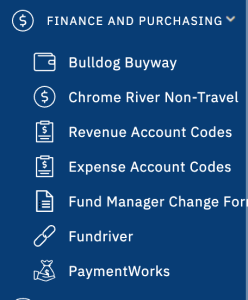
QuickLaunch > Finance and Purchasing > Account Codes
- Log in to OnePort to generate the Financial Manager Reports, summary and detail reports which can be generated for all funds for which you have access.
- For further instructions, review the How to Run Financial Manager Reports in One Port tutorial.
Please contact the Budget and Finance office for additional information regarding accounting.
Grants and Contracts
After accepting an award, the award documentation, including cost share commitments, should be forwarded to the Special Funds Accounting Office (CPO #1422).
The Special Funds Accounting Office will initiate the fund assignment. The Principle Investigator (PI) will receive notice from Finance when the Fund is activated.
NOTE: A New Award Meeting with the PI and other interested parties may be initiated if the award is considered significant or complex, the PI is new to the University, etc.
- Please review the detailed procedures on Award Account Close-Out.
- Close-out checklists are located on the Budget & Finance Forms page.
- Review the University of North Carolina Contracts & Grants Business Process Standards document.
- Review the Roles & Responsibility Matrix listed on the Contracts & Grant webpage.
- General areas covered under Contracts & Grants Management:
- Expenditure approvals and monitoring of spending against award budget.
- Cost sharing compliance.
- Allowable cost transfers and expenditures in excess of available funds.
- Sub-award(s) management, risk assessment, and monitoring.
- Billing, drawdowns, and cash management.
- The Special Funds Office manages financial reporting, including funding recovery and related expenditures reconciliation, with all external sponsors (e.g. governmental and private).
- Final reporting commonly includes both Financial and Technical reporting. The PI is responsible for the technical report and should share copies with both pre-award (OSSP) and post-award (Special Funds) offices.
UNC Asheville Reporting is distributed monthly on a fiscal year basis whereas most Contracts & Grants projects are on a project year basis. The Special Funds office can help provide either customized reporting support or enhanced Banner access.
Refer to award documentation for general terms and conditions.
If the proposed spending aligns with the award budget, then the PI generally provides final authorization. However, there may be exceptions requiring a Dean or more senior staff member’s signature in addition to the Special Funds office.
The Special Funds office manages financial reporting, including funding recovery and related expenditures reconciliation, with all external sponsors (e.g. governmental and private).
Final reporting commonly includes both Financial and Technical reporting. The PI is responsible for the Technical report and should share copies with both pre-award (OSSP) and post-award (Special Funds) offices.
Please visit the Contracts & Grants webpage for additional information.
Payroll
Please refer to the Bi-Weekly Payroll Calendar for a complete list of Timesheet and Approval Deadlines.
Please refer to the Bi-Weekly Leave Reporting Calendar for a complete list of Submission and Approval deadlines.
For supplemental payments to employees, submit a completed, signed Payroll Request Form to Payroll (CPO #1426).
The Student Employment webpage provides information on Student Employment Forms, Student Employment Policies, and Web Time Entry.
The Dual Employment Payroll webpage provides information on Dual Employment including policies and payment information.
Please visit the Payroll webpage for additional information about payroll-related processes.
Purchasing and Payments
Spending limitations are dictated by funding sources (i.e. State appropriations, student fees, grants, and gifts).
Please refer to the Spending Guidelines by Fund Source to determine if your purchase is appropriate and allowable from the chosen source of funds.
- Goods and services may be purchased using the following methods in the order that they are listed:
- Procurement Card (PCard) – you may use a PCard (if you have been issued one) provided that the purchase is allowable as outlined in the University PCard Manual.
- Bulldog Buyway – an online catalog ordering system that provides access to over 2500 vendors, including state contracts.
- You may submit an invoice attached to either an electronic check request in Bulldog Buyway.
Request access by contacting Purchasing at 828-251-6100 or purchasing@unca.edu.
Complete the Procurement Card Application and Agreement and submit to Jon Garst, Business Services Manager via email (jgarst@unca.edu) or campus mail (CPO #1425).
- The State of North Carolina negotiates statewide contracts with various vendors to ensure state agencies are able to purchase products and services at the best available price.
- Search for current state contracts.
NOTE: All goods and services purchased for the University must be purchased from current state contract vendors unless documentation is provided showing that a comparable quality of product and service can be purchased from another vendor at a lower price
- Ensure the purchase is allowed per Spending Guidelines by Fund
- Submit your paid receipt(s) in Chrome River, and any additional documentation.
- Every effort will be made to process your reimbursement within 5 business days.
- Review our website regarding payments to students.
- Determine what type of payment the student will be issued.
- Complete the Student Reimbursement report type in Chrome River if the payment is related to Reimbursements.
- Contact the Office of Financial Aid (finaid@unca.edu) to complete the Student Remuneration Form if the payment is for a Scholarship, Grant, Award, or Prize.
NOTE: Student travel is processed through our online travel system, Chrome River, and may be recorded on the student’s account and financial aid if required due to the travel type.
Visit our website for more information on Independent Contractors and Honorariums.
Visit our website for more information on Foreign Nationals.
Please visit the Purchasing website for additional information on purchasing goods and services in compliance with State and University policies and guidelines.
Receiving and Depositing Money
Please review the Cash Collection Guidelines for information regarding receiving and depositing money.
- All departments are required to be issued a receipt book if they receive funds directly from individuals in excess of $100 per month, or if they make more than one deposit per month.
- Any exceptions to this rule are based on the business needs of the department and will need to be documented in the Student Accounts Office. The department will need to complete a Receipt of Funds Agreement annually.
- Contact the Student Accounts Office at 828-251-6664 or studentaccounts@unca.edu to discuss departmental needs for receiving funds.
- A receipt or ticket must at least be offered as proof for all cash purchases.
- Receipts may be issued from a University receipt book or from a departmental system if one is utilized.
- For any other situation, please contact the Student Accounts Office at 828-251-6664.
- Receipts for check payments are optional and should be provided when requested.
- Receipts may be issued from a University receipt book or from a departmental system if one is utilized.
- For any other situation, please contact the Student Accounts Office at 828-251-6664.
- Cash and check receipts totaling $25.00 or more need to be deposited with the Student Accounts Office on a daily basis.
- Receipts under the $25.00 limit should be kept in a secured, locked drawer or box until deposited no less than weekly.
A pdf of the Deposit Slip and an Excel copy are located on the Student Accounts website.
Visit Student Accounts to view the details and processes related to Petty Cash and Change funds.
- Before a department can accept credit cards from customers as a payment option they must request approval by emailing studentaccounts@unca.edu. Approval is only given to departments that have completed the PCI Data Security Training and meet Payment Card Industry Data Security Standards, NCOSC Electronic Commerce Policies, and State Cash Management Law.
- Visit the Student Accounts website to view the details and processes related to processing credit cards and PCI Data Security Standards.
- Departments may rent a mobile credit card terminal by contacting studentaccounts@unca.edu and completing the PCI Data Security Training. The terminal is reserved on a first come, first served basis so we recommend reserving it as early as possible.
Visit the Non-Student Cashiering website, or email studentaccounts@unca.edu for additional information regarding UNC Asheville’s cashiering processes.
Student Accounts
Information about costs, billing, refunds, etc. is located on the Student Accounts webpage.
Generally, charges are not placed on student accounts for a balance owed to a department; however, a financial hold may be placed on a student’s account for a balance owed to a department to prevent registration or the release of transcripts.
These requests can be submitted via email to studentaccounts@unca.edu.
NOTE: We do not prevent students from receiving a diploma or graduating due to an outstanding balance.
- Yes, we offer the Leonard S. Levitch Student Emergency Loan, which is an interest-free, short-term loan. A maximum of $600.00 can be made available to students.
- Please visit Student Accounts for more information on the Levitch Loan program.
- The University also has a Student Emergency Fund, which is a collaborative effort between the Division of Student Affairs, the Division of University Advancement, and the Division of Academic Affairs, to financially assist students.
- For more information on this, please visit the Office of the Dean of Students’ website.
Please visit the Student Accounts website, or email studentaccounts@unca.edu, for additional information.
Transfer Request
- Cash Transfer – This is when you would like to transfer cash from one fund to support another fund. For example, perhaps another department is hosting a speaker and you want to show your support by offering money to help cover some of their costs.
- Expense Transfer – This is when an expense has been charged to your fund but you would like to transfer part or all of the expense to another fund or account. For example, perhaps you put the wrong fund or account on a check request or you would like to cover specific expenses incurred by another department.
- Revenue Transfer – This is when you would like to transfer revenue in your fund to another fund or account. For example, perhaps you put the wrong fund or account on a deposit slip or want to distribute revenue from a holding fund to other smaller funds in your area.
- For transfer requests between university funds only (funds NOT starting with a 9) email Bella Peterson at ipeterse@unca.edu
- To transfer money from a foundation fund (fund starting with a 9) to a university fund, you will need to complete a check request in Bulldog Buyway.
- The Supplier should be “University of North Carolina at Asheville”.
- The Supplier Inv # for cash transfers should be the current date followed by “Tfr” (may have to add another character if someone else has already used that date) or the invoice number provided on the interdepartmental sales invoice.
- Attachments:
- For cash transfers, attach documentation explaining the reason and amount for the transfer and use Commodity Code 84121600. For interdepartmental sales, attach the invoice and use a Commodity Code that’s fitting for the services or materials provided.
- You will also need to attach a deposit slip showing where the check should be received. For cash transfers, the account code used on the deposit slip will always be 402790. For interdepartmental sales, the account code used on the deposit slip depends on the nature of the services or materials provided. You can use the Revenue Account Codes guide for reference.
- In the Special Instructions section of the check request, include the following: “Cashiers, please see attached deposit slip.”
- Select “No” for Mail Check to Payee.
- List the “Cashiers” as the person the check should be returned to.
- For cash transfers, after you add the order to your cart and proceed to the check out screen, use account 769410 as the disbursing account code. For interdepartmental sales, the disbursing account code will vary based on the nature of the services or materials provided. You can use the Expense Account Codes guide for reference.
- Make sure to attach the deposit slip again in the External Notes and Attachments section.
- Email Giovanni Figaro at gfigaro@unca.edu if you have any questions about this process.
- To transfer money from a foundation fund to another foundation fund, email Giovanni Figaro at gfigaro@unca.edu.
- You will need to include:
- the amount of the transfer
- which fund(s) the money will come from
- which fund(s) the money is going to
- a brief description of what the transfer is for
- any attachment that will provide important details about the transfer such as an invoice, spreadsheet, Banner screenshot, receipt, etc (if applicable)
- account numbers (for expense and revenue transfers only)
- activity or location codes (if applicable)
- Be sure to include the fund manager of the disbursing fund and request them to reply all and indicate their approval if you are not the fund manager.
You do not need to include account numbers for Cash Transfers and Interdepartmental Sale Transfers.
- Transfer requests cannot be used to send money to external parties (this includes Chartwells). They are only for movement among foundation and university funds.
- You cannot transfer money from a university fund (fund number does not start with a 9) into a foundation fund (fund number starts with a 9).
- Cash cannot be transferred from State funds (fund number starts with a 2). Transfers involving these funds must be Interdepartmental Sale or Expense Transfers.
Generally, transfers take at least a week to complete since they are handled in batches throughout the month.
University Travel
- The University Travel webpage has information regarding how to plan, prepay, & get reimbursed for university travel.
- The Processes & Rates website provides information on specific travel expenses, for example per diem and lodging rates, as well as answers to other FAQs.
Please visit the University Travel website for additional information on traveling for university purposes in compliance with State and University policies and guidelines.
Contact Us
Associate Vice Chancellor for Finance/Controller
211 Phillips Hall, CPO 1422
One University Heights, Asheville, NC 28804
Office: (828) 232-5109
Fax: (828) 251-6743
Email: mhall7@unca.edu
Purchasing
121 Phillips Hall, CPO 1425
Office: (828) 251 6100
jgarst@unca.edu
cbuck@unca.edu
Accounts Payable
119 Phillips Hall, CPO 1423
Office: (828) 251-6663
acctspayable@unca.edu